Zolalia Font: A Touch of Sophistication for Your Handmade Creations
There’s something special about the moment when your design vision starts to take shape. I remember sitting at my desk, wrapping up a new batch of candle labels for the upcoming fall season, when it hit me — the right typography could elevate these simple paper tags into elegant little works of art. That’s when I discovered Zolalia. This serif display font has become a staple in my creative toolkit, adding just the right amount of class and charm to everything from product packaging to digital printables.
A Font with Character and Elegance
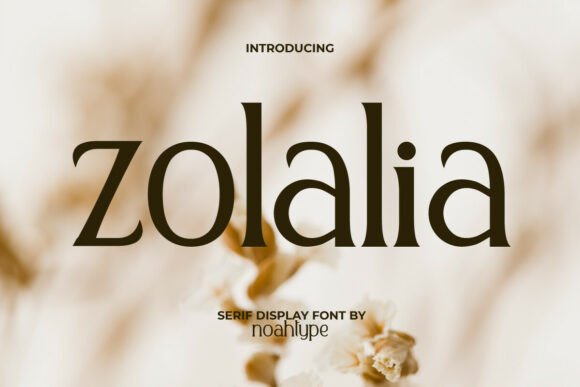
Zolalia is a serif display font that feels both refined and approachable. Its balanced letterforms and subtle detailing give it a timeless appeal without being too formal. The strokes are clean but expressive, making it perfect for those who want their designs to stand out with a sense of sophistication. It’s not over-the-top or ornate, but it carries an air of quiet confidence that makes it ideal for handmade products where quality and attention to detail matter most.
Why Zolalia Works for Makers
As someone who often uses Cricut and Silhouette for cutting stickers and tags, I know how important readability is, especially at smaller sizes. Zolalia holds up beautifully in those cases. The letters are crisp and clear, even on tiny holiday tags or delicate greeting card borders. Its generous spacing and consistent weight make it easy to work with on cutting machines, ensuring every curve and stroke translates cleanly onto vinyl, paper, or fabric.
Bringing Brand Identity to Life
I use Zolalia for more than just text; it helps define the mood of my brand. Whether I’m designing a label for a soy candle or a printable wall art preview, this font adds a touch of elegance that aligns perfectly with my aesthetic. It gives my shop a cohesive look across all product types — from seasonal mug designs to boutique-style gift tags.
Real-World Applications for Zolalia
Here are a few ways I’ve incorporated Zolalia into my craft projects:
- Candle Labels: The soft serifs and open shapes of Zolalia lend themselves well to candle names like “Evening Ember” or “Cozy Hearth.” They look warm and inviting on kraft paper, wrapped around mason jars or wooden tins.
- Greeting Cards & Invitations: I love using Zolalia for birthday cards and thank you notes. It brings a classic feel while still feeling modern and fresh. For wedding invitations, it pairs beautifully with script fonts for a layered, sophisticated look.
- Farmhouse Signs: Zolalia adds a refined twist to rustic signs. Whether it's a welcome board for a boutique or a chalkboard-style kitchen sign, the contrast between the serif typeface and natural textures always looks stunning.
- Printable Wall Art: When creating digital downloads, the visual appeal of Zolalia shines through. It works great for short quotes, poetry snippets, or minimalist sayings that customers can print and frame.
- Boutique Packaging: From tissue paper inserts to sticker seals, Zolalia elevates the presentation of each item. I use it for brand logos and taglines to create a strong, recognizable identity.
- Seasonal Designs: With its versatile style, Zolalia adapts well to different themes. Think of holiday tags, Christmas card wording, or Easter egg decorations — it keeps things festive yet elegant.
- Digital Templates: I include Zolalia in my listing images and mockups to show customers how the font looks in real life. It gives them a clear idea of what they’re getting before purchasing a digital template or SVG file.
Font Pairing Tips for Creative Projects
One of the best things about Zolalia is how well it plays with other fonts. Because it’s a serif display typeface, it naturally complements simpler sans serif fonts for body text or pricing. For example, pairing it with a clean sans serif like Montserrat or Lato helps maintain legibility while keeping the design visually interesting.
If you're going for a romantic or vintage vibe, try combining Zolalia with a handwritten or script font for accents. This contrast draws the eye and adds depth to your layouts. Just be careful not to overdo it — the beauty of Zolalia is in its balance, so let it shine as the main character in your typographic stories.
What to Look for in the Font File
Before diving into any commercial project, I always check the included styles and features. Zolalia offers multiple weights and variations, which means I can choose the right tone depending on the application. Whether I need a bolder version for a large sign or a lighter one for delicate stickers, the options are there.
The font also includes alternates and ligatures, which add personality to phrases without cluttering the design. These small details help bring a handwritten warmth to printed materials, even though Zolalia is a highly stylized typeface. And since I sell both physical and digital goods, multilingual support and proper licensing are crucial. Always verify that the font allows commercial use for your intended purpose — whether that’s selling stickers, digital templates, or branded merchandise.
Designing with Zolalia in Mind
When using Zolalia in your designs, keep in mind that it’s a display font, meaning it’s best suited for headlines, titles, and decorative text rather than long paragraphs. Its unique character works wonders for shop branding, product names, and call-to-action phrases like “Handcrafted with Love” or “Limited Edition Blend.”
For longer text, such as descriptions on packaging or back-of-card copy, I switch to a supporting serif or sans serif font to maintain readability. But the title or logo always gets a dash of Zolalia — it anchors the design and gives it a signature style.
Readability and Practical Use
While Zolalia is beautiful, I’ve learned that context matters. On small stickers, I test it at 8pt to ensure it cuts cleanly and reads easily. For product tags, I sometimes pair it with a bold outline to make it pop against background colors or textures. In web design and social media graphics, I make sure to optimize the font size and color contrast for digital screens.
Testing the font in different formats — from SVG files for cutters to PNG previews for listings — has helped me understand how it behaves under various conditions. It’s always worth experimenting with a few sample designs before finalizing anything for production or sale.
Adding Zolalia to Your Design Workflow
Incorporating Zolalia into your workflow is straightforward. If you’re using Adobe Photoshop or Illustrator, it installs like any other font. For Cricut or Silhouette users, many font files come with SVG-style outlines or glyph maps, which can be handy if you’re working with intricate letterforms or custom text effects.
I’ve found that it works particularly well in layered designs. For instance, using Zolalia as the headline font and then adding a hand-lettered flourish beneath it creates a dynamic and personal feel. It’s a great way to blend machine precision with human creativity.
Elevating Customer Experience Through Typography
Typography isn’t just about aesthetics — it plays a big role in how customers perceive your products. A well-chosen font like Zolalia can make your items feel more premium, helping justify higher price points and encouraging repeat business. It also supports brand consistency, so no matter where your customers see your name or message, it feels familiar and trustworthy.
When I designed a set of planner pages featuring motivational quotes, the choice of Zolalia made the entire layout feel curated and intentional. It wasn’t just about looking good; it was about creating an emotional connection with the user. Good typography invites people to stop, read, and engage — and that’s exactly what I wanted.
Final Thoughts (Without the Label)
Over time, I’ve realized that a font like Zolalia isn’t just another tool in my kit — it’s part of my creative voice. It’s helped me express the soul of my shop, whether I’m crafting a seasonal collection or preparing a digital downloadable template. It brings a sense of craftsmanship to every label, every invitation, and every piece of signage.
So if you’re a maker, seller, or designer looking for a premium serif font that balances elegance with usability, give Zolalia a try. Let it speak for itself on your next project, and see how it transforms your handmade creations into something truly memorable.